Pages

Subscribe:

Ads 468x60px

Wednesday, February 27, 2019

AWS Secret Manager - Protect Your Secrets in Applications

Many applications use secrets for various use cases. Using an application ID and Secret key to generate a token or maybe the secret key itself to access APIs, a username and password to create a database connection string to retrieve data from RDS. Maybe there are various security measurements and standards you’ve been enforced by your organization. One thing for sure is not storing passwords in configuration files or hard code them in plain texts. Storing and retrieving those secrets/passwords in a secure manner can be a challenging task and in this post we are going to discuss a more robust solution using AWS services.

You’ll be need a AWS account setup to follow this tutorial. Then log into your AWS console and locate Secrets Manager service under the Security, Identity and Compliance category.  Click on the “Store a new Secret”. You’ll get three options,

 1. Credentials for RDS database
 2. Credentials for other database
 3. Other Type of Secrets.

Option 1 and 2 dedicate for database credentials, We’ll select the “Other type of secrets” option since this post we going to demonstrate a more generalized solution. Now add your secrets to store securely. Use the DefaultEncryptionKey option for the demo purpose.

Hit Next and add a meaningful name for “Secret Name”, we will be using this to retrieve secrets in the application. Other options are optional and you can proceed.


Hit Next and you’ll get an option to enable Automatic rotation of the keys via a lambda function, lets keep the automated key rotation disabled and proceed to next step. Finally you’ll be redirected to the review and create step. Important thing in this step is you’ll get sample code snippets for Java, JavaScript, C#, Python 3, Ruby and Go languages.

Following is a java code snippet generated for our newly created “blog-sample” secret.

// Use this code snippet in your app.
// If you need more information about configurations or implementing the sample code, visit the AWS docs:
// https://docs.aws.amazon.com/sdk-for-java/v1/developer-guide/java-dg-samples.html#prerequisites

public static void getSecret() {

    String secretName = "blog-sample";
    String region = "us-east-1";

    // Create a Secrets Manager client
    AWSSecretsManager client  = AWSSecretsManagerClientBuilder.standard()
                                    .withRegion(region)
                                    .build();
    
    // In this sample we only handle the specific exceptions for the 'GetSecretValue' API.
    // See https://docs.aws.amazon.com/secretsmanager/latest/apireference/API_GetSecretValue.html
    // We rethrow the exception by default.
    
    String secret, decodedBinarySecret;
    GetSecretValueRequest getSecretValueRequest = new GetSecretValueRequest()
                    .withSecretId(secretName);
    GetSecretValueResult getSecretValueResult = null;

    try {
        getSecretValueResult = client.getSecretValue(getSecretValueRequest);
    } catch (DecryptionFailureException e) {
        // Secrets Manager can't decrypt the protected secret text using the provided KMS key.
        // Deal with the exception here, and/or rethrow at your discretion.
        throw e;
    } catch (InternalServiceErrorException e) {
        // An error occurred on the server side.
        // Deal with the exception here, and/or rethrow at your discretion.
        throw e;
    } catch (InvalidParameterException e) {
        // You provided an invalid value for a parameter.
        // Deal with the exception here, and/or rethrow at your discretion.
        throw e;
    } catch (InvalidRequestException e) {
        // You provided a parameter value that is not valid for the current state of the resource.
        // Deal with the exception here, and/or rethrow at your discretion.
        throw e;
    } catch (ResourceNotFoundException e) {
        // We can't find the resource that you asked for.
        // Deal with the exception here, and/or rethrow at your discretion.
        throw e;
    }

    // Decrypts secret using the associated KMS CMK.
    // Depending on whether the secret is a string or binary, one of these fields will be populated.
    if (getSecretValueResult.getSecretString() != null) {
        secret = getSecretValueResult.getSecretString();
    }
    else {
        decodedBinarySecret = new String(Base64.getDecoder().decode(getSecretValueResult.getSecretBinary()).array());
    }

    // Your code goes here.
}


If you check the code you can see that, it is using the “secretName” and the stored “region” to fetch the secret data.


You can use either the secret name or secret ARN to retrieve the secrets. Now let’s try our sample code in our local environment to access secrets values.
1. To run the sample locally you need to configure the AWS CLI, using [a]

[a]. https://docs.aws.amazon.com/cli/latest/userguide/cli-chap-configure.html

2. Add the following maven dependency.
      
            com.amazonaws
            aws-java-sdk-secretsmanager
            1.11.502
       

 3. Build the project using following command
mvn clean install
4. Run the assembly plugin
mvn assembly:single
5. Run the uber jar using following command
java -jar target/aws-secrets-manager-test-1.0-SNAPSHOT-jar-with-dependencies.jar

You’ll get the secret as following in decrypted manner.

Now you learned,how to store secrets using AWS Secrets Manager and retrieve them in your Applications. But there is a catch here, when configuring the AWS CLI tool you have to store the AWS Access Key ID and the AWS Secret Access Key, which is not the best practice to host them in the AWS EC2 servers. If  a server is compromised, the intruder can easily pick your AWS credentials stored in the ~/.aws/credentials file.

Overcome the storing of Secret Keys

In above use-case, we have to hard code AWS credentials, which is not recommended. Let’s spin up a  ec2 instance and copy our sample app and see whether we can access the secrets we stored in the AWS Secrets Manger.

1. Spin up a ec2 t2 micro instance.
2. Then copy the sample application to the new ec2 server.
scp -i ec2.pem ~/code-base/aws-secrets-manager-test/target/aws-secrets-manager-test-1.0-SNAPSHOT-jar-with-dependencies.jar ec2-user@ip-address:/home/ec2-user
3. Install java in your ec2 instance.
    sudo yum install java-1.8.0-openjdk
4. Run the application
java -jar aws-secrets-manager-test-1.0-SNAPSHOT-jar-with-dependencies.jar

You’ll be ended up with the following error.

It complains that you don’t have the AWS-ACCESS_KEY and AWS_SECRET_KEY unable to load AWS credentials.

Overcome the issue using IAM roles.

Now lets create an IAM role so that my ec2 instance can access the AWS Secrets Manager and retrieve the stored secret values.

1. Go to Services -> IAM -> Roles → Create Role.
2. Select type of trusted entity as AWS service
3. Select EC2
4. Hit Next- Permissions.
5. Search for the permission policy “SecretsManagerReadWrite” and select.
6. Hit Next-Tags.
7. Add tags if you need hit Next.
8. Give a role name and hit Create Role.


Note - It would be if you can create a more granualar role, which can only read the AWS Secrets Manager, since the “SecretsManagerReadWrite” policy has more permissions than we required.
Next Goto → Services → EC2 → Instances → Actions → Instance Settings → Attach/Repalce IAM Role


Select the newly created role and apply.

Now let’s try to run our sample application copied to the AWS EC2 instance. You should be able to read the secrets.


So in this post we have discussed an important aspect of storing and retrieving secrets required for you applications. Since as per my experience this has become a chicken and egg problem, when comes to security the secrets and securing the master key which secure those secrets. I think using the Role approach will help to overcome this problem.

Please add your comments/thoughts if you think there are better ways to overcome this :) Sample Code Link

Monday, January 21, 2019

"React, Redux and Saga" Connecting the Dots.

"Viewer discretion advised" This article is written by a person who is very new to front-end programming with react and worked on backend development with number of years ;), and I’m quite fascinated about the UI work recently, since UI libraries are adopting some of the distributing computer theories/features used in middleware applications.

If you have worked with the angular, passing state within components is not as clean as you would have liked. In my personal opinion React handled the situation quite delicately.  Using React-Redux a centralized big static state object share within the whole application and, react-saga, a library which handles the application side effects, e.g. asynchronous actions. In this tutorial, we will build a react application which used the react, redux and saga. 

I will try to explain how the component interaction and state update works by using the sample I prepared for this post. The sample application uses react redux and saga. It is pretty straight forward, What it does is, it has a button which used to fetch all the users from executing a remote API call. See below diagram to simplify the concept behind the sample.


This is the simple workflow theory behind event dispatching, remote data fetching, state changes and propagate that changes to the UI. This cycle continues until the lifecycle of the component ends.

A . Denotes the UI action which resulted in a dispatch event. Below is sample code that fire up a dispatch event with the event name and the data used for the event. In this example we dispatch a UI event, to fetch all the users list. So we dispatch an event which is the type of ‘FETCH_USERS’

const mapDispatchToProps = (dispatch) => {
    return {
        fetchUsers : () => {
            dispatch({
                type: 'FETCH_USERS'
            })
        }};};

B. We have an API call defined to get all user data, from a mockable URL.
When the ‘FETCH_USERS’ event got fired, there is a UserSaga, listening for this type of events, and it will fire up the UserApi.getUsers.(). After receiving the data, it will fire up another event to update the store. See below code snippet in the UserSaga.js file

//Fetching the users list
const response = yield call(UserApi.getUsers);

// Then instructing the middleware to action to update the store.
        yield put({
            type: ACTION_TYPES.UI_ACTION.ON_USERS_DATA,
            data: response.data
        });

In UserSaga.js we have defined the takeEvery(pattern, saga, ...args), so whenever it matches the ‘FETCH_USERS’ pattern, it will dispatch the event, to update the store. Each call it will construct a new task for the matching event.

An application can have multiple sagas’s based on the requirement, so we pile them into one main saga, as in the MainSaga.js

C. Now comes to the store update section, as you saw on the step ‘B’ there is a new event fired to update the redux store, which is ‘ON_USERS_DATA’, so we have to catch that event and update the state change. For that we used the UserReducer.js
export default function userReducer(state = initialState, action) {
    switch (action.type) {
        case ACTION_TYPES.UI_ACTION.ON_USERS_DATA:
            return Object.assign({}, state, {userList: action.data});
        default:
            return state;
    }
}

Here we have updated the userList in the store object into the new data. Now the update of the redux store is complete.

D. Now we have to listen to that state update and handle the UI update in the render method, inside the Component. We will receive the update to the component via, mapStateToProps method.

const mapStateToProps = (state) => {
    return {
        users: state.userActions.userList
    };
};

Now the newly fetched, User List is visible to the UI. So now you have connected the dots, between react, redux and redux-saga. Hope you have gained some idea of how the component interaction works, and don’t forget to comment on your thoughts as well.

Source code for this sample can be found here. https://github.com/arunasujith/react-redux-saga-sample
Or you can try to create the project from scratch. First, install the create-react-app using below command.

npm i -g create-react-app

Now create a sample project.

create-react-app react-redux-saga-sample

Run the project using,

npm start

Need to install the following react libraries.

npm install --save axios
npm install --save redux
npm install --save redux-saga
npm install --save react-redux 

Wednesday, November 14, 2018

Hashi Corp KV Secrets Manager integration with SpringBoot Application

Securing your secrets inside application is not an easy task. Typically applications deployed to multiple environments, and developers have to maintain separate credentials for each environment in configuration files, if there is no encryption mechanism (most of the time :( ) those username and passwords or secrets for token generation (API keys), database connections are stored as plain text. If there is a security breach, sensitive data can be compromised and lose millions of your business, because of not having encryption in place.

To address this there are various solutions available in the market. The most popular ones are the AWS Secret Manager, HashiCorp, Google Cloud KMS etc. Most of these services provide Authorization to secret vaults, Verification of Usage of Keys, Encryption data at rest, Automated Key Rotation etc. Selecting a suitable application is depend on your requirement of the organization or by the features of the service. If you are using AWS and deployed your application is cloud, AWS Secret Manager is one best possibility, since the management overhead is minimal. But for some companies which having serious security concerns, they tend to use on premise solution, and Hashi Corp can be a suitable choice. 

The scope of this post is to how to configure and use HashiCorp KV Secret Engine, and consume those secrets inside a SpringBoot application. Image result for hashicorp vault
Image source - https://www.vaultproject.io/
Configuring the Hashi Corp Vault.
1. Download the community version from [1]. https://www.vaultproject.io/downloads.html
2. Extract and set the path to the vault bin

export PATH=$PATH:/home/aruna/vault/bin

3. Start the vault with dev configuration

vault server --dev --dev-root-token-id="12345678" // use secure token to seed

 4. Now open another terminal and put some secrets to the vault, In KV secrets engine version 2 write operation has changed to put.

export PATH=$PATH:/home/aruna/vault/bin
vault kv put secret/my-secret username=spring-user password=se3ret

5. You can test the values are saved to vault using following curl command.

 curl --header "X-Vault-Token: 12345678"        http://127.0.0.1:8200/v1/secret/data/my-secret

      If the request is a success should get the below response.

{  
   "request_id":"b0a0f055-3eed-b3c1-353f-427de8f61bcd",
   "lease_id":"",
   "renewable":false,
   "lease_duration":0,
   "data":{  
      "data":{  
         "password":"se3ret",
         "username":"spring-user"
      },
      "metadata":{  
         "created_time":"2018-11-14T09:21:46.812937558Z",
         "deletion_time":"",
         "destroyed":false,
         "version":2
      }
   },
   "wrap_info":null,
   "warnings":null,
   "auth":null
}

More about the rest API can be found here.
[2]. https://www.vaultproject.io/api/secret/kv/kv-v2.html

Setting up the SpringBoot project to consume the secret stored above.

Add the following properties to your bootstrap.properties file. Before starting the application, these values should be injected to the spring vault to work.

spring.application.name=my-secret // name of the KV secrets engine
spring.cloud.vault.token=12345678 //token value set for server
spring.cloud.vault.scheme=http
spring.cloud.vault.kv.enabled=true

Then load the properties as follows.

@ConfigurationProperties
public class SecretConfiguration {

    private String username;
    private String password;

    public String getUsername() {
        return username;
    }

    public void setUsername(String username) {
        this.username = username;
    }

    public String getPassword() 
        return password;
    }

    public void setPassword(String password) {
        this.password = password;
    }
}


Full sample can be found here. [3]. https://github.com/arunasujith/hashi-corp-vault-sample
That's it for this article, hope you to see you in another exciting post.

Tuesday, October 23, 2018

My path to AWS Solutions Architect - Associate

As a part of Pearson Internal Employees’ Learning and Certification Program, I was given the opportunity to take the exam, in 2018 Q2. But due to the release schedules and other work, I was unable to complete within Q2. But determined to complete in Q3 2018.
So in this post, I’m going to explain my experience for the exam and the steps I’ve followed.

Things I’ve followed to get certified.
  1. Created a personal account in  https://console.aws.amazon.com, you need  a credit/debit card to use the free tier resources.
  2. Purchased the https://www.udemy.com/aws-certified-solutions-architect-associate/ course from Udemy. Cost around 10$ at that time.
  3. Official Book from Amazon. https://www.safaribooksonline.com/library/view/aws-certified-solutions/9781119138556/
  4. Book the exam using (cost around 150$) https://www.aws.training/
At the beginning I’ve got no idea regarding the scope of the exam other than [5], Older exam consists of 130 questions and the 2018 February updated with 65 questions. Had to do the latest one but there were less resources regarding the new version even in official exam guide [6].

I was recommended the course in Udemy taught by Ryan Kroonenburg. I purchased the course and followed every lesson of it. And I did the practical sessions using the aws console. So I had a better idea on the practical exercises. Then I did the exercises again alone to verify that I can do them by myself. For sections like VPC, I did try out several complex scenarios with security groups, NACL’s so I got the confident.

The course was good and it covered a lot, but for the exam I think that will not be enough. At the end of each section I read the FAQ section in the amazon official documentation. When doing the mock exercises in the course I was worried that it contained questions asking exact numbers for certain AWS services, but in real exam I did not encounter such questions.

But you need to have a clear understanding of certain comparisons aspect of scalability, availability and cost wise.

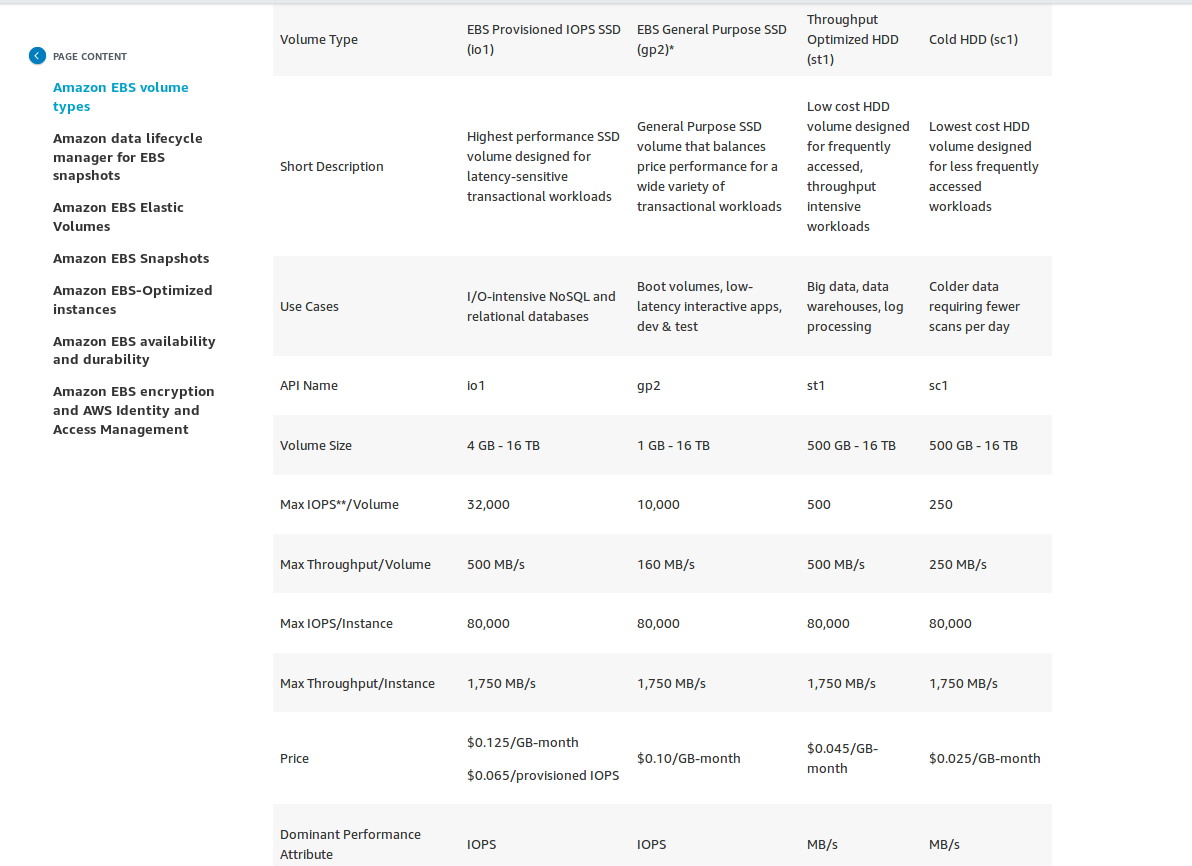
For example when talking about AWS EBS storage classes, you need to understand the different use cases for the ESB classes, General purpose SSD, EBS Provisioned IOPS SSD, Throughput Optimized HDD, Cold HDD. See below graph [7].

[7]. https://aws.amazon.com/ebs/features/

Almost all the questions are scenario based and you have to select the correct answer. Maybe they are looking for the COST aspect for the answer, or maybe the performance aspect. My personal opinion is that, you need to visualize those different classes with the rough numbers in mind.

And for some questions you have to compare cross services. For e.g. S3, EBS, EFS.


After I got confident enough, I booked the exam on 12th October 2018. From the 65 questions I flagged around 10 questions. Which means I was confident on 55 questions which make me above the minimum score. But trust me it was not easy as I thought it would be. However I was able to score got certified.

My final word for the exam takers, don’t take it easy, and practice and learn to compare the services to purpose the best solution in terms of cost and performance wise.


Wish you guys all the best for the exam :)

Friday, August 10, 2018

Drools - How we overcame the drastic conditions evaluation


One year ago, we started a project called keystone, a rules evaluation engine based on spring-boot. The high level architecture as follows [1]. It exposes several REST endpoints to evaluate some business rules. When a request hits the engine, several parallel calls hit the described endpoints based on the input parameters. ( We use RxJava to handle the async calls and zip out the results.) Then we have various IF ELSE blocks to evaluate the rules. And sent back the results back to the client after the rule evaluation.


At the beginning the rules were quite simple and everyone was happy with the architecture and the evaluation of the rules. There was a manageable number of rules with simple if else blocks, and the changes to existing rules were quite minimum at that time.

But when time passed by, there were many requests from partner teams and the rules engine team was asked to implement more logical evaluations, so new REST endpoints were introduced. Now the problem became more complex and hard to manage the rules in our code as well as presenting the rules. When some business users ask what happens if we use the REST endpoint X, we have no way to easily explain all the conditions and evaluation paths in a simple manner.

Then the drools comes into the picture to address this problem. We evaluate the drools and did POC for both the drl file and decision table approaches. The code becomes much more simpler and lean since all the evaluation tree was derived from the decision table. Then we presented both the drl file and decision table to the business people and they were really admired the decision table approach since it became more easy to present to other partner teams.
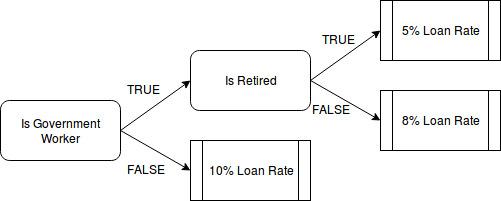
See below for an example decision table which is being used. It contains 10 decision points before the evaluation.


Let’s look into a sample which use a decision table to evaluate some rules. 


Sample use case.
We are going to evaluate the loan rate given by ABC bank depending on the customer is a GOVERNMENT or a PRIVATE worker and currently a retired person or not. Decision table for the above scenario is as follows.


Decision table for the above use case.


Maven dependencies.

 1
 2
 3
 4
 5
 6
 7
 8
 9
10
11
12
13
14
15
        <dependency>
            <groupId>org.drools</groupId>
            <artifactId>drools-core</artifactId>
            <version>7.0.0.Final</version>
        </dependency>
        <dependency>
            <groupId>org.kie</groupId>
            <artifactId>kie-spring</artifactId>
            <version>7.0.0.Final</version>
        </dependency>
        <dependency>
            <groupId>org.drools</groupId>
            <artifactId>drools-decisiontables</artifactId>
            <version>7.0.0.Final</version>
        </dependency>
Load the Configurations
 1
 2
 3
 4
 5
 6
 7
 8
 9
10
11
12
13
14
public KieContainer getKieContainer() {

        KieServices kieServices = KieServices.Factory.get();
        KieFileSystem kieFileSystem = kieServices.newKieFileSystem();
        kieFileSystem.write(ResourceFactory.newFileResource(drlFile));
        KieBuilder kieBuilder = kieServices.newKieBuilder(kieFileSystem);
        kieBuilder.buildAll();
        KieModule kieModule = kieBuilder.getKieModule();

        KieContainerkieContainer =  kieServices.newKieContainer(kieModule.getReleaseId());

        return kieContainer

}


We use the ExecutionBase class to hold the facts and the conditions. Fact is of course the Customer object and isGovernmentWorker() and is Retired() conditions.
 1
 2
 3
 4
 5
 6
 7
 8
 9
10
11
12
13
14
15
16
17
18
19
20
21
22
23
24
public class ExecutionBase {

    private Customer customer;

    public Customer getCustomer() {
        return customer;
    }

    public void setCustomer(Customer customer) {
        this.customer = customer;
    }

    public boolean isGovermentWorker() {
        return this.customer.getWorkType().equals(WorkType.GOVERNEMNT);
    }

    public boolean isRetired() {
        return this.customer.getAge() &gt; 60;
    }

    public void execute(String result) {
        System.out.println(result);
    }
}


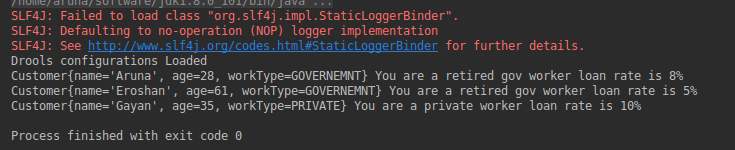
After the execution we get the entitlement loan rate for a bank customer. Try out the sample code link.


To summarize the post, we discussed how we can leverage the drools decision tables to overcome if there are drastic conditions evaluations in your program and you want to change those conditions without touching the code. Other advantage is the decision table can be used as a tool to describe your execution flow for non technical people. That’s it for this post and hope to see you in another exciting post.

Monday, September 25, 2017

oauth2 implicit grant flow - example using facebook oauth2 API

In this post we are going to explore on the oauth2 implicit grant flow using a facebook oauth2 API example. In the oauth2 client specification, the clients are categorized as trusted and untrusted.
Trusted oauth2 clients
Trusted oauth2 clients are usually application following the mvc architecture, where the application has the facility to store the keys securely. In a later post we will explore more on trusted oauth2 clients. 
Untrusted oauth2 clients
Pure html / javascript applications are considered as untrusted oauth2 clients. These applications typically don’t have a way to securely store information. Typically these applications need to initiate the authorization flow for each session.


Normal flow of an untrusted oauth2 client.

Implicit grant flow - sample usecase


The above example use case is for a Travel Buddy App, which needs user’s facebook friend list to suggest the user travel buddies.

  1. User requesting the Travel Buddy App to suggest him more friends.
  2. Travel Buddy App, says, sure I can do that, but first goto this url and authorize me.
  3. Travel Buddy App redirect to facebook Consent Page and presented with a authorization confirmation page with list of scopes.
  4. When user, says yes, redirect to the Travel Buddy App with a token to use.
  5. Travel buddy app initiate a request to get the friend list from facebook, presenting the token received in the previous step.
  6. Travel Buddy app receives the friend list.

So let’s implement this.

I assume you have a facebook account and first you need to register this Travel Buddy App with facebook. Then you’ll receive a client_id for your application.

Facebook settings.
  1. Login to facebook and go to https://developers.facebook.com/
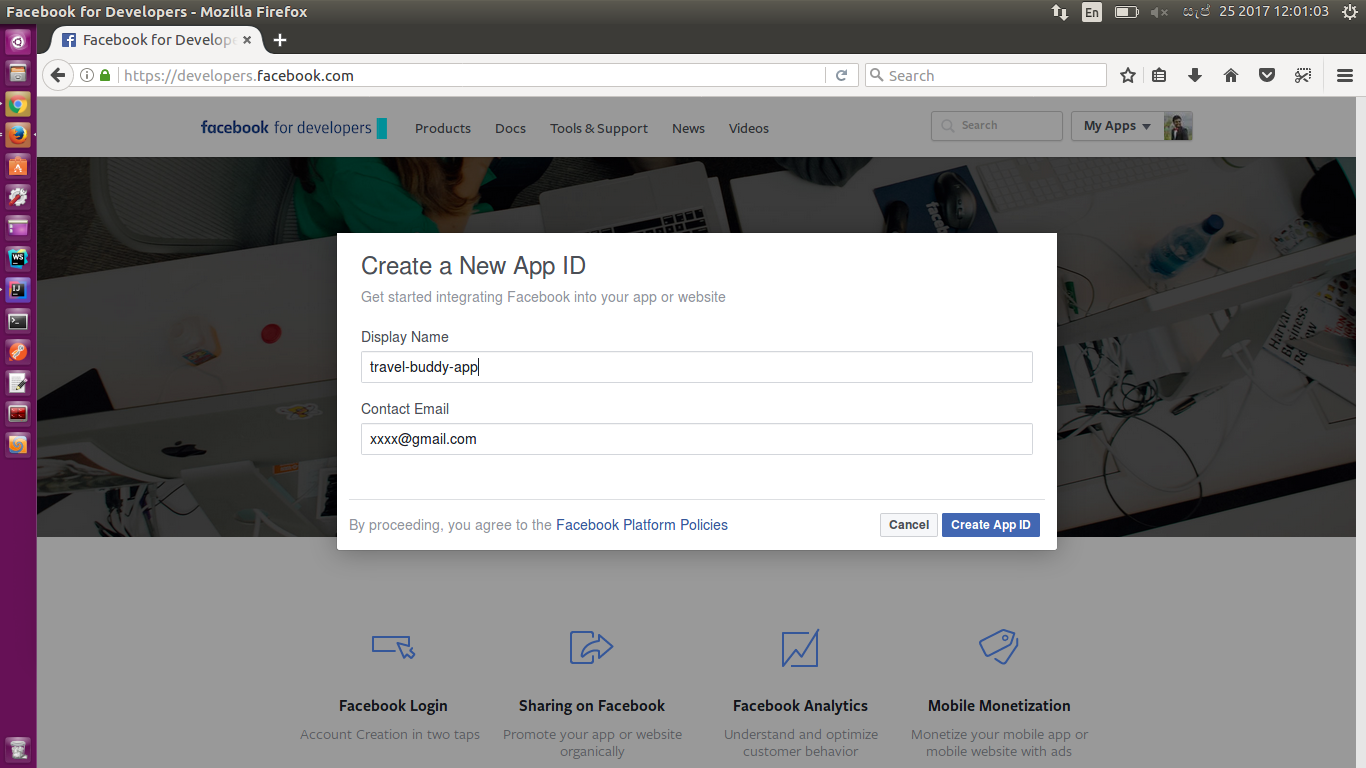
  2. Click on Add a New App and provide a display name and contact email. Click Create App ID.
Screenshot from 2017-09-25 12-01-03.png

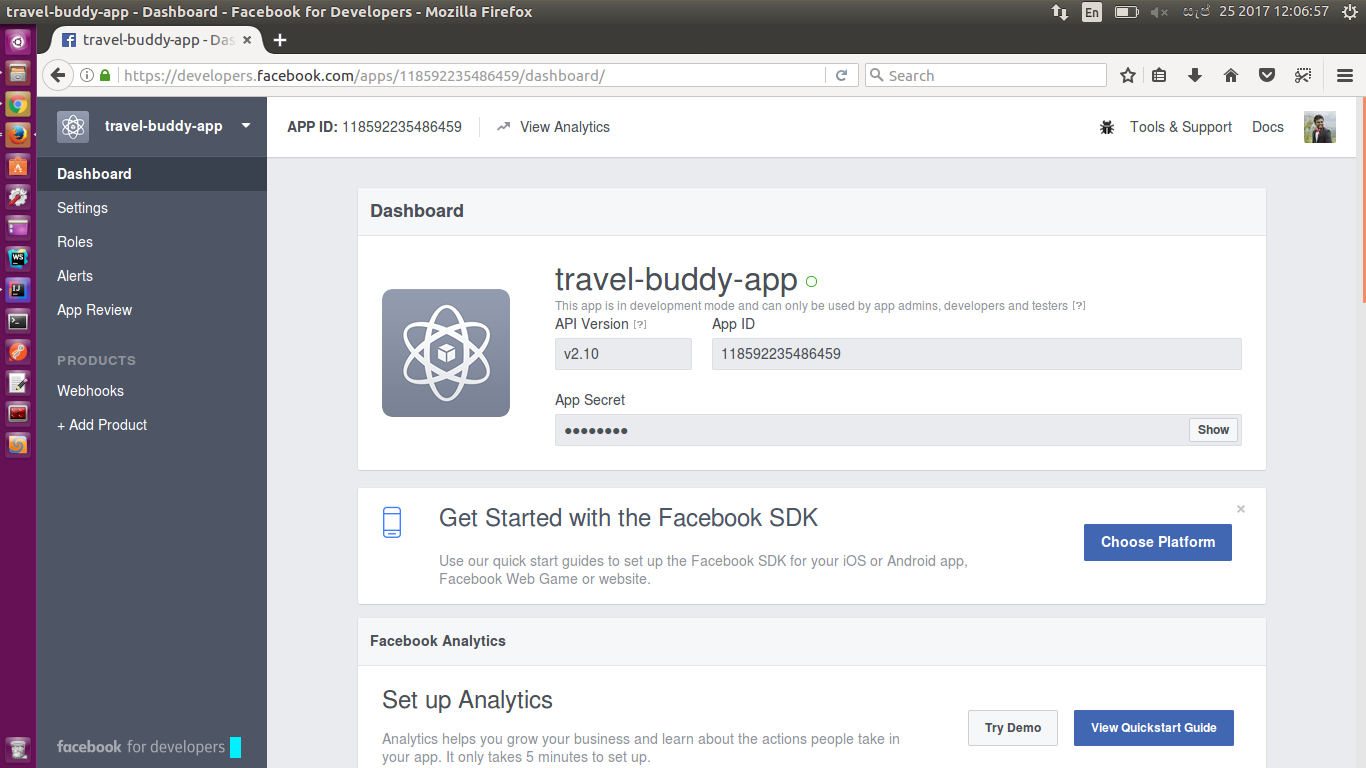
  1. Then you’ll redirected to following dashboard with App Id and App Secret.

Screenshot from 2017-09-25 12-06-57.png

  1. Now select Add Product and select Facebook Login, click setup.
add-product.png

  1. Choose platform web, fill out the details and save.
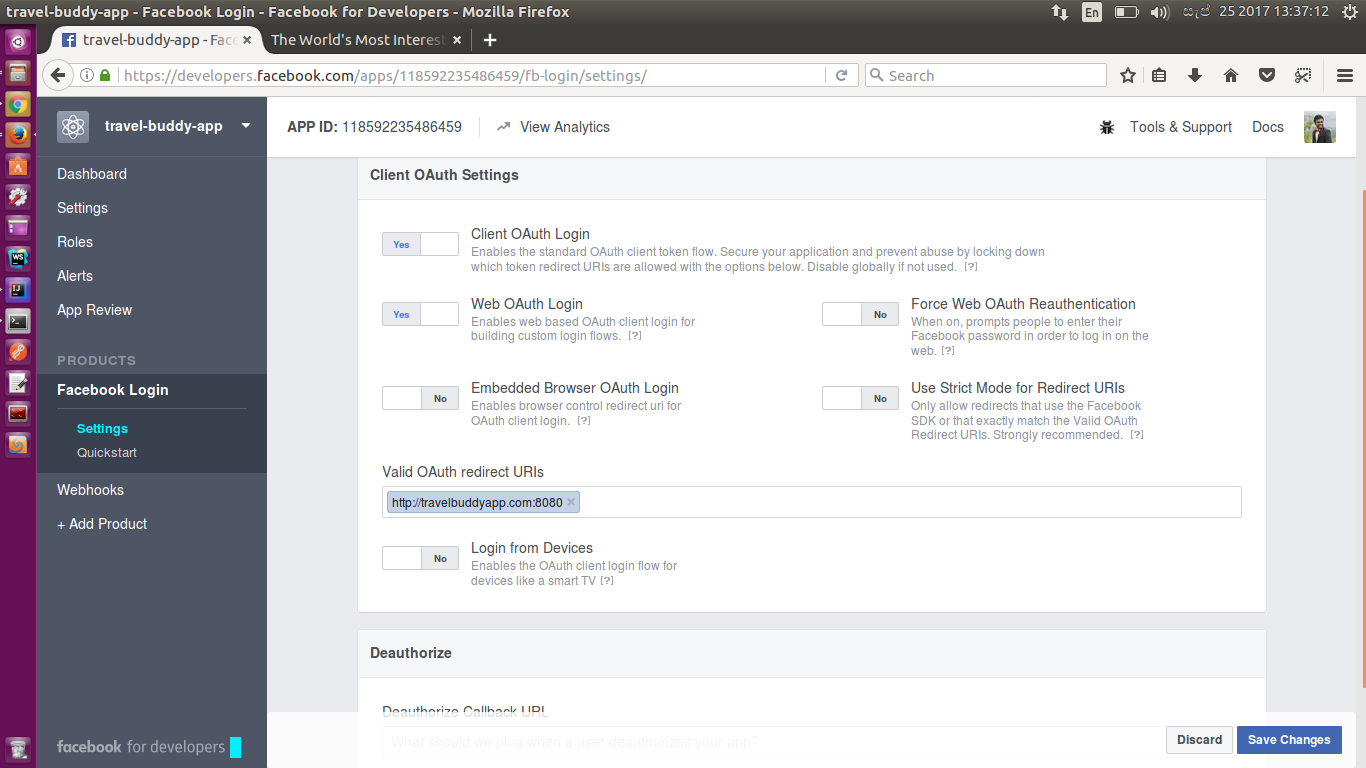
  2. Go to Products -> Facebook Login -> Settings, Add the Valid OAuth redirect URIs, in our sample it is, http://travelbuddyapp.com:8080

oauth.png


Now all set from facebook settings.

Let’s move on the Travel Buddy App implementation.

  1. Need to create a simple web skeleton. You can use the following maven archetype.

mvn archetype:generate -DgroupId=com.sample -DartifactId=travel-buddy-app -DarchetypeArtifactId=maven-archetype-webapp -DinteractiveMode=false

  1. Remove the index.jsp file, since we are implementing a simple html js application.
  2. First we have to write the getting the token function. We have to make  a GET request to dialog/oauth endpoint with the following details.
    var facebookAuthEndpoint = "https://www.facebook.com/v2.10/dialog/oauth";
    var responseType = "token";
    var clientId = "118592235486459";  
    var redirectUrl = "http://travelbuddyapp.com:8080/callback.html";
    var scope = "public_profile user_friends";
    
  1. Since we are  s the application to redirect, we have to provide the redirectURL. The scope is the permission list we are requesting from the user. In this case we need public_profile and user_friends.
Note that the permission list in scope variable is given a space separated list.
  1. The calling URL will be similar to the following, Note that the url parameters needs to be encoded.
https://www.facebook.com/v2.10/dialog/oauth?response_type=token&client_id=118592235486459&redirect_uri=http%3A%2F%2Ftravelbuddyapp.com%3A8080%2Fcallback.html&scope=public_profile%20user_friends

  1. Then after redirecting to facebook website, if the user is already logged in, he will be presented a user consent page. If not first redirected to the login page.
  2. After the authorization of the user, will be redirected with the token appended to the browser URl. Process the browser URl and acquire the access_token.

var fragment = location.hash.replace('#', '');

  1. Then we have to make two API GET calls to facebook using this access token.

I. Make a call to get the profile details and extract the profile ID.
II. Make another call to get the suggested friend list using that profile ID.

       var userEndpoint = "https://graph.facebook.com/v2.10/me?fields=name&access_token="  
                                                                    + accessToken;
       var userId = "";
       //ajax GET call to get user ID
       $.get(userEndpoint, function(data, status){
           userId = data.id;
           var friendListEndpoint = "https://graph.facebook.com/v2.10/" + userId + 
     "/friends?access_token=" + accessToken;

           $.get(friendListEndpoint, function(data, status){
                 $("#response").html(JSON.stringify(data));
           });
       });          

  1. We just showing the friend list appended to the html.

Now that’s it, you have acquired oauth2 token using the implicit grant flow approach and use that to extract the friend list.

Testing the Application.

  1. Set the following host entry.
127.0.0.1    travelbuddyapp.com
  1. Deploy the webapp in tomcat and access the following url.
http://travelbuddyapp.com:8080/
  1. Click the Call Facebook
  2. And you’ll get the friend list data.

So we have covered the implicit grant flow and the few characteristics we observed is that, it’s pretty straightforward to implement. And the negative points to be considered are approach is considered as to be less secure since we are exposing the access token, this is a short term access methodology, Since there is no way to securely store the keys, the authorization flow has to be reinitiated for latter use. Sample code can be found here. 

Let’s meet with a new blog post on oauth2 authorize grant flow exercise.